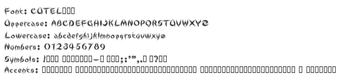
Cute Line, created by Cute Line, is a decorative script font designed to mimic natural calligraphy and add a personal, handcrafted touch to headings and short display text. It delivers a flowing handwritten style with consistent line weight, available as TTF and OTF for wide application use. The font includes uppercase and lowercase letters, numerals, and basic punctuation, targeting graphic designers, DIY creatives, and social media authors who need a friendly, artisanal script for invitations and visuals.
What the font changes about display typography
The font applies a flowing, calligraphic script to headings and short decorative text, replacing mechanical sans or serif headings with a hand-drawn look. Its defining traits are fluid strokes and a consistent line weight, which aim to add personality without sacrificing clarity. Use cases include printed invitations, social posts, and short labels where a handwritten tone matters more than long-form readability.
How much typographic control the font supplies
The font provides the basic typographic building blocks designers need: a complete uppercase and lowercase set, standard digits, and common punctuation. It does not advertise extended multilingual coverage for all versions, so designers who need accented glyphs should verify character support. The design emphasizes legibility at small decorative sizes, making it suitable for headings and brief callouts rather than long paragraphs.
How it fits into common design workflows
The font installs as a system typeface and integrates with typical desktop applications, including Microsoft Word and Adobe Creative Cloud, and with photo editors that read system fonts. Supply of both TrueType (TTF) and OpenType (OTF) formats ensures compatibility with most layout and image programs. Because it functions as a normal system font, it appears in application font menus once installed, so designers can apply it directly in existing projects.
Is installation and daily use simple for nontechnical users?
Installation follows a familiar desktop process: extract the ZIP, right-click the .ttf or .otf file, and choose Install, after which the font appears in application lists. That workflow suits hobbyists and social media creators who use standard design tools. For users who require accented characters or advanced typographic features, checking the specific font file before a major project avoids surprises.
Who should pick this font and how to use it
The font suits creators who want a warm, handcrafted heading style rather than a neutral text face; it performs best in short, attention-grabbing text. Practical tip: pair the font with a neutral sans for body copy to preserve readability, and confirm accent coverage before multilingual work. The font is a practical choice for designers and hobbyists seeking approachable, handwritten display typography, with a focus on decorative applications rather than extended body text.
Pros
Clean strokes maintain legibility at small decorative sizes
Provided in both TTF and OTF for broad application use
Includes full uppercase, lowercase, digits, and basic punctuation
Cons
Extended multilingual accent coverage varies by version
Best suited to short display text, not long paragraphs
No explicit mention of advanced OpenType alternates or stylistic sets
Laws concerning the use of this software vary from country to country. We do not encourage or condone the use of this program if it is in violation of these laws. Softonic may receive a referral fee if you click or buy any of the products featured here.